How to Compress a PDF Under 500KB
A PDF gets under 500KB only if most of its weight is pictures that can be shrunk. In our real-file tests, scans often made it and text papers and photo brochures did not.
It depends on what’s inside
A PDF is made of text, vector graphics and pictures. Text and vectors are already compact and the tool leaves them alone. Pictures are where the weight is, and pictures can be re-compressed. So a scanned document (every page is a picture) has room to shrink, while a text paper or a form has almost none.
What we saw on real PDFs
WillItUpload was tested on 29 real public PDFs (scans, brochures, forms, papers). Here is the 500 KB target column for nine of them, in Safari’s engine, with sizes in KB:
| Kind of PDF | Original | At a 500 KB target | Reached? |
|---|---|---|---|
| Scanned certificate | 1,030 | 438 | Yes |
| Scanned A4 certificate | 1,110 | 421 | Yes |
| Scanned document | 1,420 | 426 | Yes |
| Scanned poster | 1,360 | 454 | Yes |
| Scanned report with a text layer | 1,790 | 588 | No: best readable result |
| Scanned annual report | 2,530 | 2,130 | No |
| Text paper (arXiv) | 2,110 | 1,740 | No: almost all text |
| Photo brochure | 8,490 | 3,930 | No |
| Scanned certificate on a huge page | 18,830 | 927 | No |
Four of the nine reached 500 KB. The other five stopped at the best result that was still readable, and said “target not reached”. That is deliberate: the tool stops at a quality floor instead of destroying the document to hit a number.
How to do it
- Open Compress PDF and add your file.
- Choose Target size and enter 500 KB.
- Read the report: the new size, whether the target was reached, and what was kept (page count, page sizes, selectable text).
If your PDF is already under 500 KB it is returned exactly as it was.
What “target not reached” looks like
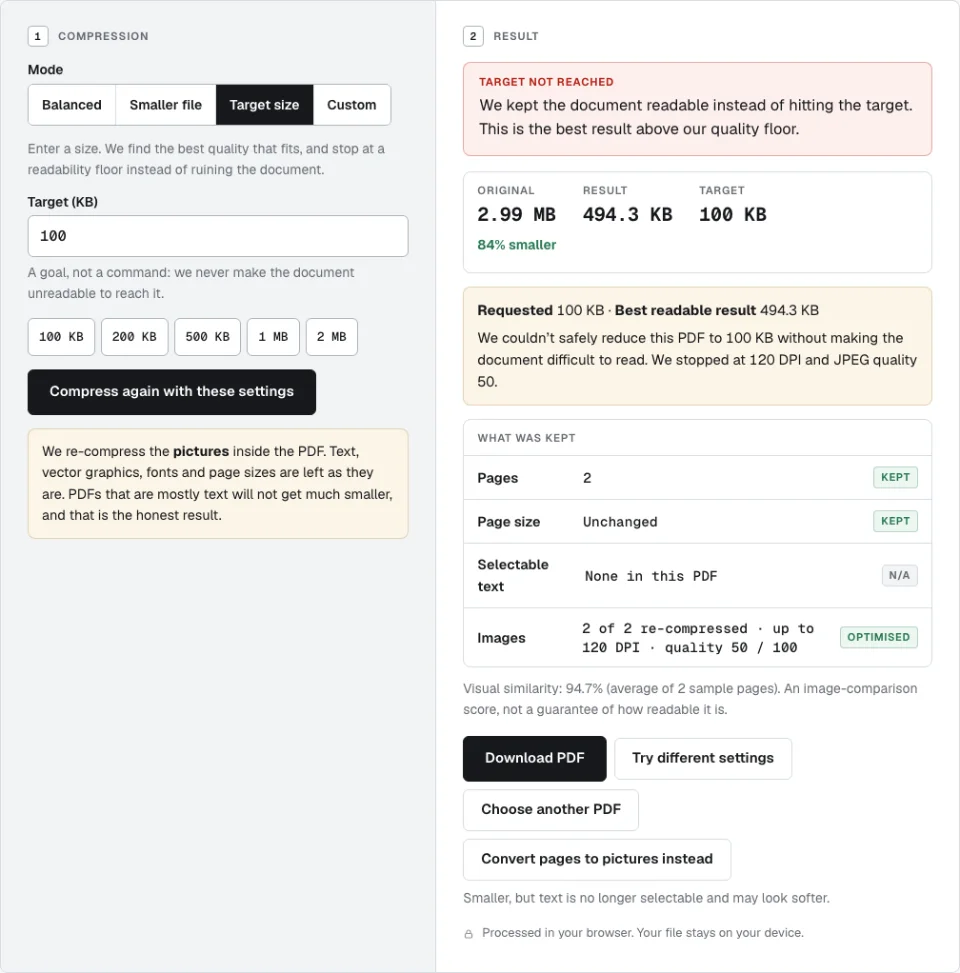
If the target isn’t reached
Your options, roughly in order of preference:
- Ask for a higher limit, or check whether the portal also accepts a different form of the document.
- Rebuild the PDF from smaller pictures. If you have the original photos or scans, Image to PDF can build a PDF under a size limit, keeping the best quality that fits.
- Remove pages you don’t need before compressing.
- Convert pages to pictures instead. After a missed target, Compress PDF offers this as an opt-in. It can be smaller, but text is no longer selectable and may look softer. It is never done automatically.
A word on 100KB
Very small targets are usually unrealistic for anything but a single simple page. The run above shows it: a 2.99 MB scan aimed at 100 KB stopped at 494.3 KB, because anything smaller would have been hard to read. For a middle ground, see how to compress a PDF under 1MB.